Rockwell Automation Standards

Be sure to check out the Brand Identity site for all things Rockwell brand. Below you'll find technical specifications for different media deliverables.

Videography

  • Specifications for Video files (encoding settings)

    Naming Convention - MUST BE USED FOR ALL COMPLETED PROJECTS
    Anything other than this format is to be considered a working version.

    Title, Custom Version Information (if needed), Language (if needed), Aquent Project#
    (note*: space between words is now okay, file extension no longer required)

    Example: PowerFlex 755 Demo, BDmeeting Short, Eng, 8404

    Encode Settings:

    Rockwell Standard - Presentation from Rockwell Automation computers, or posting to VidYard/YouTube.
    File Type - .mp4, 720p HD
    Video Settings - codec H264 , frame size 1280x720p, 29.97 frames per second (commonly referred to as 30fps), bitrate 10 Mbps
    Audio Settings - 48khz, 16 bit, 192kbs

    Rockwell Mobile - Mobile Device - iPad, iPhone, Android, Launch Pad
    File Type - .mp4, 720p HD
    Video Settings - codec H264 , frame size 1280x720p, 29.97 frames per second (commonly rerfered to as 30fps), bitrate 5 Mbps
    Audio Settings - 48khz, 16 bit, 192kbs

    Pro Presentation - Presentation to Large groups with presentation CPU (Professional Audio Visual Technician using Playback Pro Software).
    File Type - .mp4, 1080p HD
    Video Settings - codec H264 , frame size 1920x1080p, 29.97 frames per second (commonly referred to as 30fps), bitrate 18 Mbps
    Audio Settings - 48khz, 16 bit, 320kbs

    Aquent Archive - editor's copy for professional use
    File Type - .mp4, 1080p HD
    Video Settings - codec XDCAM HD, frame size 1920x1080p, 30 frames29.97 frames per second (commonly referred to as 30fps)
    Audio Settings- 48khz, 16 bit, 320kbs Please contact Todd Keller with any questions.
Photography

  • Basic Specifications for Rockwell Automation IDW Product Photography

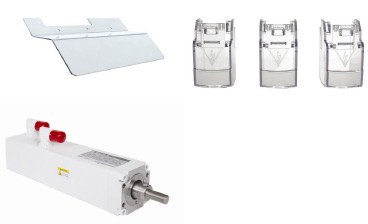
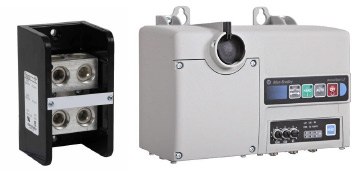
    The objective is to shoot a crisp image on a white background, showing height, width and depth of product.

    camera settings

    Camera settings:

    • ISO 100 recommended
    • Jpeg file format.
    • 21MP: 3744 x 3744 @ 2:2
    • Highest resolution possible (at 1000x1000 pixels minimum, 300DPI)
    • White Balance set to flash or daylight setting.
    • Processed images should be on a white background with NO drop shadow and should be saved as a JPEG with the lowest compression settings possible.
    • Negative Space as needed. All images shot for final image size of 1000 X1000 Pixels or Square. (Note that original IDW images are checked into Media Bin and the publication process to the external image server takes care of converting them to IDW images meeting IDW size specifications).

    Catalog Naming Convention:

    • Use catalog number or product shot as file name. For example: 194E-A125-1753.jpg

    Product Styling:

    • Products should be shot on a white background unless product is white


    • camera settings

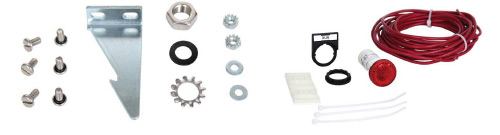
    • Cords should be coiled and wires should be arranged in a neat and tidy fashion.
    • If the product is a cord or wiring harness, it should be coiled and positioned in such a way that all of the key features are still visible.


    • camera settings

    • Arrange accessory products or parts kits in a visually pleasing, balanced and symmetrical composition.
    • The use of stands, shims, tape and other positioning tools are often required to position the product in a visually appealing way. This is not an exact science, but it has a huge impact on the quality of your final image.

    Angles:

    • Product should be photographed from the angle from which it is most recognizable, slightly above the product level. Some possible angles are:
      • Angle 1: Front of product
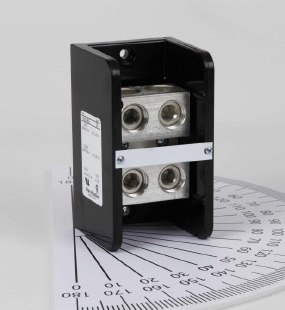
      • Angle 2: Down, 13 degrees
      • Angle 3: Turned, 20 degrees

    Here are some visual references to help you achieve the best results:

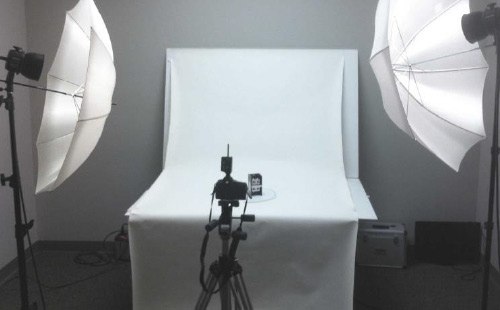
    Shoot product on a white background with diffused flash lighting (see below).

    camera settings

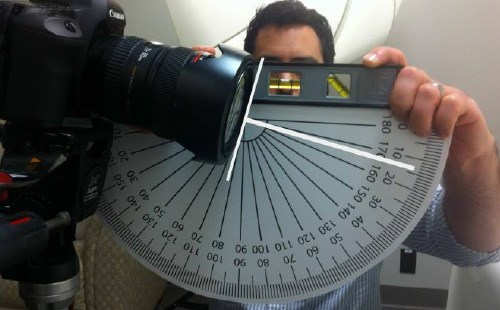
    Camera should be positioned at a 13 degree down angle (see below).

    camera settings

    Product should be positioned at most recognizable angle – example: 20 degrees (see below).

    camera settings